Stage 7: Fireball Factory
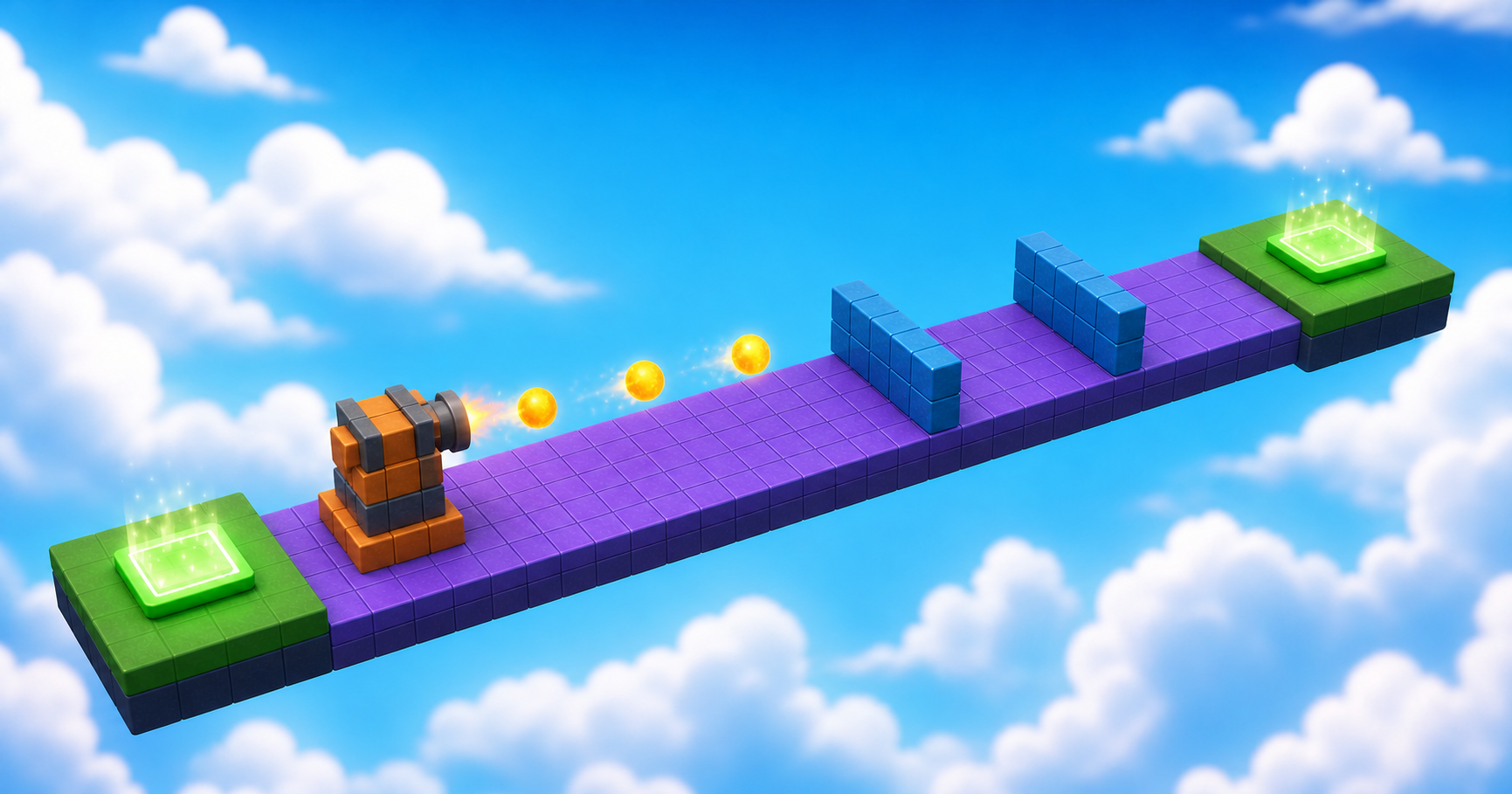
Your beam keeps its rhythm, saved at Checkpoint_07. Ahead, your game starts manufacturing danger: a cannon that builds a new projectile every few seconds — powered by your first function.
Narration transcript
- Stage Six taught a beam to keep a rhythm, saved at Checkpoint zero seven. Keep that tested checkpoint open. Stage Seven begins there.
- Build a cannon lane with real cover, learn functions, and ship a fair crossing under fire.
- Spoken bridge: Mission ready. First, understand the idea that makes this stage work.
a cannon lane with real cover
how a function packages reusable instructions
a fair crossing under fire
Idea
Narration transcript
- A function packages instructions under one name so you can run them again and again. launchFireball builds a ball, aims it from Muzzle toward FireballTarget, and cleans it up — and a loop calls that function forever. Names matter here: the script finds its target by name.
- Spoken bridge: Turn that idea into three small Logic Cards.
A function gives a group of instructions one name. Our launchFireball() will create a ball, style it, aim it, react to touch, and schedule cleanup — and the loop only needs to call that name, forever.
Two names matter today more than anything else: the script finds its aim point with stageFolder:WaitForChild("FireballTarget"), so Muzzle and FireballTarget must be spelled exactly and sit as siblings in your stage folder. Where you put them is your design; what they're called is the deal you make with your code.
This is a longer script, so build it in tested layers. Never debug the whole factory at once.
Logic Board
Finish these cards from left to right. Each card becomes a Code Quest below.
- 1Card A
Narration transcript
- Make and style one fireball inside a function.
- Calling the function creates a visible ball.
Create the product
Make and style one fireball inside a function.
Done when: Calling the function creates a visible ball. - 2Card B
Narration transcript
- Launch the ball, react to touch, and clean up.
- The ball flies the lane and never piles up.
Launch and clean
Launch the ball, react to touch, and clean up.
Done when: The ball flies the lane and never piles up. - 3Card C
Narration transcript
- Run the factory on a loop and save the checkpoint.
- A steady rhythm launches and Checkpoint zero eight saves.
- Spoken bridge: The plan is complete. Pick your Build Mode on the page and build one card at a time — pause after every Studio action.
Run the factory
Run the factory on a loop and save the checkpoint.
Done when: A steady rhythm launches and Checkpoint_08 saves.
Build
Pick your Build Mode for the arena — the function is the same for everyone. Watch the two exact names.
Every builder plays this stage in their own mode. Which sounds like you?
Not sure? Start with Guided — you can level up on any stage, and your pick follows you through the whole course.
Names that must match
Build inside Workspace → Course → Stage07, from Checkpoint_07 to Checkpoint_08. Scripts find objects by name — these spellings are the wiring. Everything else about each object is your call.
FireballPathThe open lane the fireballs sweep.Cover_1A cover object big enough to fully block a fireball.Cover_2A second cover object, spaced for cover-to-cover advances.BarrelThe visible cannon — pure decoration, style it your way.MuzzleInvisible helper the script fires from. The exact name matters.Must have: Transparency 1 · CanCollide false · Script: FireballControllerFireballTargetInvisible helper the script aims at. Must be Muzzle's sibling with this exact name — the script calls stageFolder:WaitForChild("FireballTarget").Must have: Transparency 1 · CanCollide falseLanding_08The landing that ends the stage — Checkpoint_08 stands here.
Reference buildStuck, or just want to copy ours? Here is exactly how we built this stage.
These values always work together. Copy them as-is, or borrow a few and keep the rest of the stage yours.
Build this partFireballPath
Part · BlockOpen recipe
FireballPath
Part · Block- Size
- 12 × 1 × 56
- Anchored
- ✓ Yes
- Orientation
- 0 × 0 × 0
- CanCollide
- ✓ Yes
- Place
- Position [0, 3.5, 432] inside Workspace → Course → Stage07
Build this partCover_1
Part · BlockOpen recipe
Cover_1
Part · Block- Size
- 9 × 8 × 2
- Anchored
- ✓ Yes
- Orientation
- 0 × 0 × 0
- CanCollide
- ✓ Yes
- Place
- Position [-1.5, 7.5, 435] inside Workspace → Course → Stage07
Build this partCover_2
Part · BlockOpen recipe
Cover_2
Part · Block- Size
- 9 × 8 × 2
- Anchored
- ✓ Yes
- Orientation
- 0 × 0 × 0
- CanCollide
- ✓ Yes
- Place
- Position [1.5, 7.5, 441] inside Workspace → Course → Stage07
Build this partBarrel
Part · CylinderOpen recipe
Barrel
Part · Cylinder- Size
- 6 × 3 × 3
- Anchored
- ✓ Yes
- Orientation
- 0 × 0 × 0
- CanCollide
- ✓ Yes
- Place
- Position [-14, 6, 438] inside Workspace → Course → Stage07
Build this partMuzzle
Part · BlockOpen recipe
Muzzle
Part · Block- Size
- 1 × 1 × 1
- Anchored
- ✓ Yes
- Orientation
- 0 × 0 × 0
- CanCollide
- ✗ No
- Transparency
- 1
- Place
- Position [-9, 6, 438] inside Workspace → Course → Stage07
Children: Script: FireballController.
Build this partFireballTarget
Part · BlockOpen recipe
FireballTarget
Part · Block- Size
- 1 × 1 × 1
- Anchored
- ✓ Yes
- Orientation
- 0 × 0 × 0
- CanCollide
- ✗ No
- Transparency
- 1
- Place
- Position [9, 6, 438] inside Workspace → Course → Stage07
Build this partLanding_08
Part · BlockOpen recipe
Landing_08
Part · Block- Size
- 12 × 1 × 12
- Anchored
- ✓ Yes
- Orientation
- 0 × 0 × 0
- CanCollide
- ✓ Yes
- Place
- Position [0, 3.5, 465] inside Workspace → Course → Stage07
Code
Create one fireball
Narration transcript
- Build your factory per your track — the open lane, at least two real covers, a decorative cannon, and the two invisible helpers named exactly Muzzle and FireballTarget, level with each other on opposite sides of the lane. Then insert FireballController inside Muzzle and type the function that creates one styled ball. Call it once, temporarily.
- Spoken bridge: Card A now matches its success check. Continue to Card B.
A — Create the product. Build your factory per your track. Then insert a Script inside Muzzle, rename it FireballController, and type the function that creates one styled ball. Temporarily add launchFireball() at the bottom and press Play: one ball appears at the muzzle and drops out of the sky. That's right — it has no engine yet; Card B gives it one. Remove the temporary call.
local muzzle = script.Parent
local stageFolder = muzzle.Parent
local target = stageFolder:WaitForChild("FireballTarget")
local Debris = game:GetService("Debris")
local ballSpeed = 35
local launchDelay = 2

local function launchFireball()
  local ball = Instance.new("Part")
  ball.Shape = Enum.PartType.Ball
  ball.Size = Vector3.new(3, 3, 3)
  ball.Material = Enum.Material.Neon
  ball.Color = Color3.fromRGB(255, 100, 0)
  ball.CanCollide = false
  ball.Position = muzzle.Position
  ball.Parent = workspace
end
Move, react, and clean up
Narration transcript
- The function packages the whole product: create, aim, launch, react, clean up. Debris is the cleanup crew.
- Add the aim line, the touch reaction, and the Debris cleanup before the function's end, then call it once more.
- Spoken bridge: The behavior passed its focused test. Finish the checkpoint handoff.
The function packages the whole product: create, aim, launch, react, clean up. Debris is the cleanup crew — no factory should fill Workspace with old products.
B — Launch and clean. Add these lines before the function's end, then call it once more. The ball should always travel from Muzzle toward FireballTarget and disappear on impact or after four seconds. If it flies diagonally, realign the two helper parts — fix parts, not code.
  local direction = (target.Position - muzzle.Position).Unit
  ball.AssemblyLinearVelocity = direction * ballSpeed

  ball.Touched:Connect(function(otherPart)
    if otherPart == muzzle then return end
    local humanoid = otherPart.Parent:FindFirstChildOfClass("Humanoid")
    if humanoid then
      humanoid.Health = 0
    end
    ball:Destroy()
  end)

  Debris:AddItem(ball, 4)
Run the factory loop
Narration transcript
- Add the factory loop after the function. Tune ballSpeed or launchDelay only after it works. Then add Landing zero eight and complete the Checkpoint zero eight recipe.
- Spoken bridge: The next checkpoint saved. One designer check before you style it: does your stage pass?
C — Run the factory. After the function, add the loop below. Tune ballSpeed or launchDelay only after the factory works. Then add an anchored Landing_08 past the lane (reference: [12, 1, 12]) and complete the checkpoint recipe.
while true do
  launchFireball()
  task.wait(launchDelay)
end
Compare your finished script
local muzzle = script.Parent
local stageFolder = muzzle.Parent
local target = stageFolder:WaitForChild("FireballTarget")
local Debris = game:GetService("Debris")
local ballSpeed = 35
local launchDelay = 2

local function launchFireball()
  local ball = Instance.new("Part")
  ball.Shape = Enum.PartType.Ball
  ball.Size = Vector3.new(3, 3, 3)
  ball.Material = Enum.Material.Neon
  ball.Color = Color3.fromRGB(255, 100, 0)
  ball.CanCollide = false
  ball.Position = muzzle.Position
  ball.Parent = workspace

  local direction = (target.Position - muzzle.Position).Unit
  ball.AssemblyLinearVelocity = direction * ballSpeed

  ball.Touched:Connect(function(otherPart)
    if otherPart == muzzle then return end
    local humanoid = otherPart.Parent:FindFirstChildOfClass("Humanoid")
    if humanoid then
      humanoid.Health = 0
    end
    ball:Destroy()
  end)

  Debris:AddItem(ball, 4)
end

while true do
  launchFireball()
  task.wait(launchDelay)
end
Checkpoint recipeSave progress at Stage 8
Using the voice guide? It reads one recipe step, waits while you work, then continues when you choose Done — hear next step.
- Insert one SpawnLocation in Workspace and rename it
Checkpoint_08. Set Size to about[6, 1, 6]and Anchored totrue. Centered on the landing that ends Stage 7, with its top just above the landing surface. (Our reference build puts it at Position[0, 4.5, 465].) - Set Neutral to
false, Enabled totrue, and AllowTeamChangeOnTouch totrue. - Set the SpawnLocation TeamColor to
Earth green. Set its visual BrickColor to the same named color. TeamColor controls respawning; BrickColor only controls what the pad looks like. - Point at Teams in Explorer, select its +, and insert one Team named
Stage 8. Set its TeamColor toEarth greenand AutoAssignable tofalse. Never reuse this TeamColor on another checkpoint. - Press Play. Climb to and touch
Checkpoint_08, then reset your character and confirm you respawn there. Press Stop before editing again.
Workspace → Checkpoint_08Teams → Stage 8 (Earth green)Does It Pass?
Narration transcript
- Time for the designer check. Play your factory and walk the pass list: fireballs fly the lane at chest height, there is no way around, every cover keeps you out of the firing line, and a patient player can cross fairly. A rule that fails is just the next thing to tune.
- Spoken bridge: Your stage passes — it is a real level now. Time to make it feel like your game.
Does your stage pass?
Play your stage and check each one. A rule that fails isn't a mistake — it's just the next thing to tune.
- Nothing moves, falls, or drifts — every part stays exactly where you put it.Check: Press Play — everything stays put.Tip: Anchored on for every part, and CanCollide on for anything players stand on.
- Muzzle and FireballTarget sit level with each other on opposite sides of the lane, so every fireball flies the straight line between them across the path.Check: Watch a fireball fly straight down the lane at chest height.Tip: About 2–3 studs of air between the path and the flight line puts every shot at body height.
- The path from the checkpoint to the landing passes through the fireball lane — there is no route around it.Check: Try to sneak past outside the lane: you can't.
- At least two covers — one before the firing line, one after — each keeping you fully out of the line and too tall to hop over.Check: Hide behind each cover through a shot untouched, then cross fairly.Tip: Keep every cover half a stud clear of the firing line itself, or it will eat the fireballs.
Make It Yours
Narration transcript
- Restyle the danger: the fireball's color and material lines in the script are yours to change, and the cannon is pure decoration. Snowballs, meteors, cursed pumpkins — make the factory manufacture your world's danger.
- Spoken bridge: That is your stamp on the stage. Now explain what made it work.
What does your world shoot? Snowballs, meteors, cursed pumpkins? The ball's Size, Material, and Color lines in the function are yours to restyle — and the cannon is pure decoration. Change the look, keep the aim line and cleanup untouched, and your factory manufactures your world's danger.
Help Ladder
Stuck? Choose what went wrong
Pick the problem that matches. Open one clue, try it, then return only if you still need help.
My parts overlap or miss the next checkpoint
Clue 1: small hint
Narration transcript
- Stop Play mode and check one part against the stage rules before touching anything else.
Clue 2: where to look
Narration transcript
- Check Workspace, Course, Stage zero 7, and keep both checkpoints directly inside Workspace.
Workspace → Course → Stage07. Find Checkpoint_07 and Checkpoint_08 directly inside Workspace.Clue 3: worked answer
Narration transcript
- Walk your stage rules top to bottom and fix the first rule that fails. If you want a layout that always works, open the reference build and copy its values.
Checkpoint_07.my fireballs vanish partway down the line
Clue 1: small hint
Clue 2: where to look
Clue 3: worked answer
no fireballs appear
Clue 1: small hint
Narration transcript
- Test the factory before testing movement.
Clue 2: where to look
Narration transcript
- Put one temporary launchFireball call after the function and watch Output.
launchFireball() after the function and watch Output.Clue 3: worked answer
Narration transcript
- Confirm every creation line is inside the function, ball dot Parent equals workspace comes before the function ends, and the loop calls the exact name launchFireball.
ball.Parent = workspace comes before the function ends, and the loop calls the exact name launchFireball().Learn What Happened
Narration transcript
- One function fired every shot: build, aim, launch, clean up — packaged under one name and called on a loop. You changed the style lines and the logic stayed true. That separation is what makes code reusable.
- Spoken bridge: Use one small prediction to transfer that idea.
The function described one complete product; the loop decided when to make another. Debris kept old fireballs from filling Workspace. And when you restyled the ball, the logic didn't care — style lines and logic lines live in the same function but do different jobs. That separation is what makes code reusable.
Try This
Narration transcript
- Predict what changing ballSpeed does to fairness, compare with one playtest, and connect the result to the function's aim line.
- Spoken bridge: Finish with four proof checks. Each check must match something you can observe or explain.
Try this
Three short thinking checks. Use evidence from the stage you just built.
Prove It
Narration transcript
- Spoken bridge: Final proof. Confirm one result at a time.
- Your cannon fires from Muzzle toward FireballTarget across the path, and players can hide behind real cover.
- Fireballs move, damage, clean up, and leave a fair crossing.
- Checkpoint_08 saves progress and reset returns you there.
- You can explain the function, loop, and cleanup step.
Narration transcript
- Stage Seven complete. You packaged danger into a function and earned one hundred XP. Stage Eight makes the whole arena spin.