Stage 6: Laser Loop
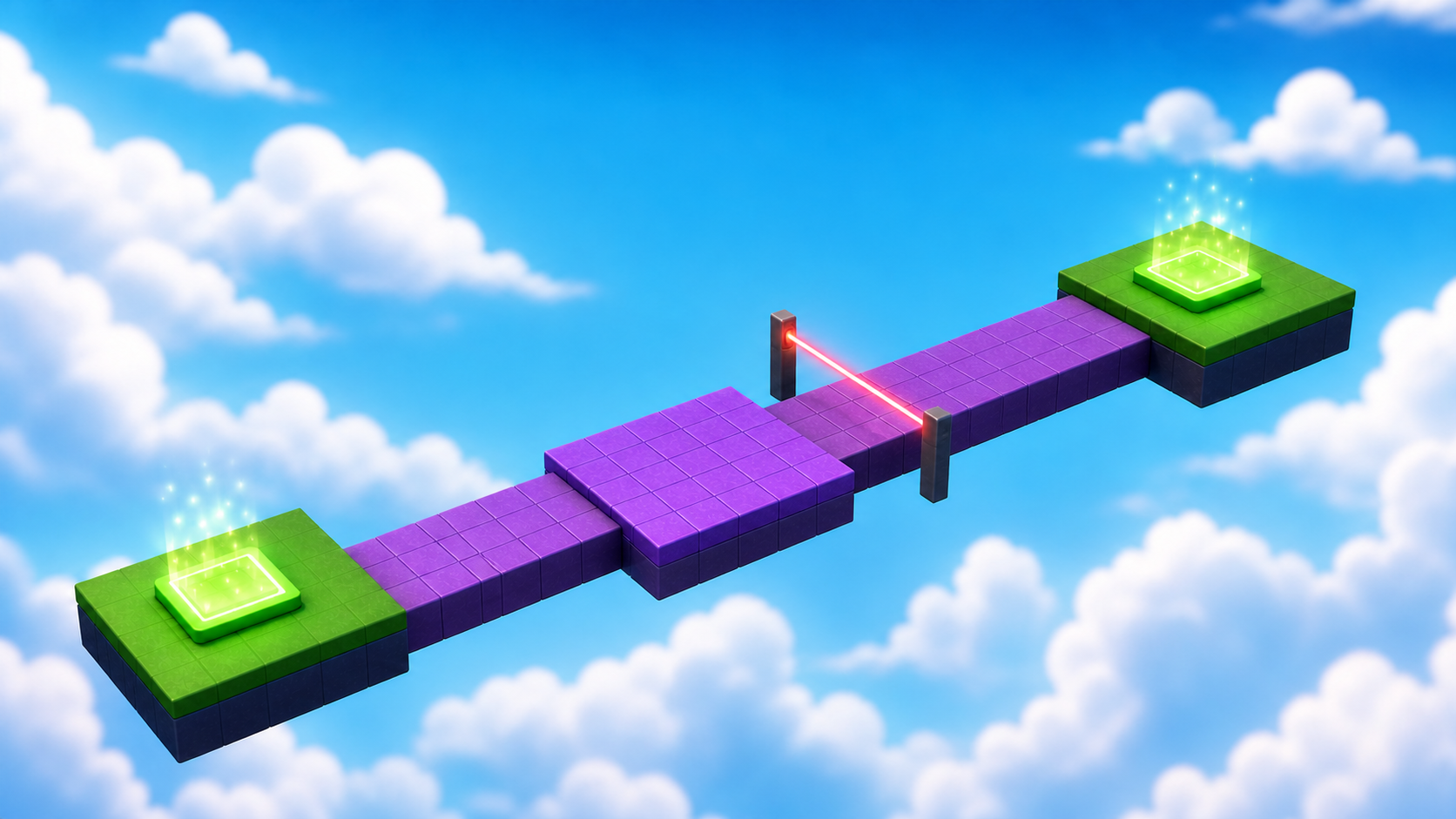
Your platforms keep their own state now, saved at Checkpoint_06. Ahead, something new: a hazard with a heartbeat — a beam that sweeps the path on a rhythm your players must learn.
Narration transcript
- Stage Five shipped platforms that remember their state, saved at Checkpoint zero six. Keep that tested checkpoint open. Stage Six begins there.
- Build a beam that cycles on a rhythm, learn loops and variables, and ship a crossing won by timing, never by luck.
- Spoken bridge: Mission ready. First, understand the idea that makes this stage work.
a beam that cycles between danger and safety
how loops repeat and variables control timing
a crossing won by timing, never by luck
Idea
Narration transcript
- A loop repeats instructions forever; variables tune what each pass does. Your beam cycles between danger and safe — and because the times live in variables, you can tune the rhythm like a designer instead of rewriting code.
- Spoken bridge: Turn that idea into three small Logic Cards.
A loop repeats instructions. A while true do loop repeats until the game stops. Variables like dangerTime and safeTime let you tune the rhythm without rewriting the loop — they're your difficulty knobs, and turning them is designing.
The player must be able to read the two states at a glance: bright and solid means danger, faint and passable means go.
Logic Board
Finish these cards from left to right. Each card becomes a Code Quest below.
- 1Card A
Narration transcript
- Store the rhythm in variables.
- Timing values live at the top of the script.
Define the rhythm
Store the rhythm in variables.
Done when: Timing values live at the top of the script. - 2Card B
Narration transcript
- Repeat two states with a loop.
- The cycle continues by itself.
Repeat two states
Repeat two states with a loop.
Done when: The cycle continues by itself. - 3Card C
Narration transcript
- Add the consequence and save the checkpoint.
- The active beam has teeth and Checkpoint zero seven saves.
- Spoken bridge: The plan is complete. Pick your Build Mode on the page and build one card at a time — pause after every Studio action.
Add the consequence
Add the consequence and save the checkpoint.
Done when: The active beam has teeth and Checkpoint_07 saves.
Build
Pick your Build Mode for the crossing — the loop is the same for everyone, and its variables are yours to tune.
Every builder plays this stage in their own mode. Which sounds like you?
Not sure? Start with Guided — you can level up on any stage, and your pick follows you through the whole course.
Names that must match
Build inside Workspace → Course → Stage06, from Checkpoint_06 to Checkpoint_07. The scripts here live inside the parts they control — no name hunting yet. These names keep your Explorer readable and your stage debuggable. In Stage 7, scripts start finding parts by name — then spelling becomes law.
WaitingPadA safe place to stand and read the laser's rhythm.WalkwayThe path the laser sweeps across.LaserThe beam that cycles between danger and safe.Must have: Material Neon · Script: LaserControllerLanding_07The landing that ends the stage — Checkpoint_07 stands here.
Reference buildStuck, or just want to copy ours? Here is exactly how we built this stage.
These values always work together. Copy them as-is, or borrow a few and keep the rest of the stage yours.
Build this partWaitingPad
Part · BlockOpen recipe
WaitingPad
Part · Block- Size
- 16 × 1 × 12
- Anchored
- ✓ Yes
- Orientation
- 0 × 0 × 0
- CanCollide
- ✓ Yes
- Place
- Position [0, 3.5, 353] inside Workspace → Course → Stage06
Build this partWalkway
Part · BlockOpen recipe
Walkway
Part · Block- Size
- 12 × 1 × 32
- Anchored
- ✓ Yes
- Orientation
- 0 × 0 × 0
- CanCollide
- ✓ Yes
- Place
- Position [0, 3.5, 375] inside Workspace → Course → Stage06
Build this partLaser
Part · BlockOpen recipe
Laser
Part · Block- Size
- 14 × 5 × 1
- Color
- Really red
- Material
- Neon
- Anchored
- ✓ Yes
- Orientation
- 0 × 0 × 0
- CanCollide
- ✓ Yes
- Place
- Position [0, 9.5, 375] inside Workspace → Course → Stage06
Children: Script: LaserController.
Build this partLanding_07
Part · BlockOpen recipe
Landing_07
Part · Block- Size
- 12 × 1 × 12
- Anchored
- ✓ Yes
- Orientation
- 0 × 0 × 0
- CanCollide
- ✓ Yes
- Place
- Position [0, 3.5, 398] inside Workspace → Course → Stage06
Code
Build and name the timing controls
Narration transcript
- Build your crossing inside Stage zero six per your track: a waiting pad, a walkway, and a beam named Laser spanning it at character height. Then insert LaserController inside Laser and type the two timing variables.
- Spoken bridge: Card A now matches its success check. Continue to Card B.
A — Define the rhythm. Build your crossing per your track. Then insert a Script inside Laser, rename it LaserController, delete the placeholder, and type the two timing variables — these numbers are seconds, and they are the difficulty controls.
local laser = script.Parent
local dangerTime = 1.5
local safeTime = 1
Code the repeating states
Narration transcript
- A while true loop repeats forever. Each pass shows danger, waits, shows safety, waits — and the variables decide the rhythm.
- Type the repeating states and watch the visual rhythm before adding any danger. Then tune dangerTime and safeTime until the rhythm is learnable — strict but fair.
- Spoken bridge: The behavior passed its focused test. Finish the checkpoint handoff.
A while true do loop repeats forever. Each pass shows danger, waits, shows safety, waits — the variables decide the rhythm.
B — Repeat two states. Add the loop below and watch the visual rhythm before adding any danger. Then tune dangerTime and safeTime until the rhythm feels learnable — strict but fair.
while true do
  laser.Transparency = 0
  laser.CanCollide = true
  laser.CanTouch = true
  task.wait(dangerTime)

  laser.Transparency = 0.85
  laser.CanCollide = false
  laser.CanTouch = false
  task.wait(safeTime)
end
Connect the consequence
Narration transcript
- Place the Touched consequence above the loop, test both states, then add Landing zero seven and complete the Checkpoint zero seven recipe.
- Spoken bridge: The next checkpoint saved. One designer check before you style it: does your stage pass?
C — Add the teeth. Place this event code above the while loop, then test both states: the bright beam must block and defeat a player; the faint beam must let them pass. Then add an anchored Landing_07 past the beam (reference: [12, 1, 12]) and complete the checkpoint recipe.
laser.Touched:Connect(function(otherPart)
  local humanoid = otherPart.Parent:FindFirstChildOfClass("Humanoid")
  if humanoid then humanoid.Health = 0 end
end)
Compare your finished script
local laser = script.Parent
local dangerTime = 1.5
local safeTime = 1

laser.Touched:Connect(function(otherPart)
  local humanoid = otherPart.Parent:FindFirstChildOfClass("Humanoid")
  if humanoid then humanoid.Health = 0 end
end)

while true do
  laser.Transparency = 0
  laser.CanCollide = true
  laser.CanTouch = true
  task.wait(dangerTime)

  laser.Transparency = 0.85
  laser.CanCollide = false
  laser.CanTouch = false
  task.wait(safeTime)
end
Checkpoint recipeSave progress at Stage 7
Using the voice guide? It reads one recipe step, waits while you work, then continues when you choose Done — hear next step.
- Insert one SpawnLocation in Workspace and rename it
Checkpoint_07. Set Size to about[6, 1, 6]and Anchored totrue. Centered on the landing that ends Stage 6, with its top just above the landing surface. (Our reference build puts it at Position[0, 4.5, 398].) - Set Neutral to
false, Enabled totrue, and AllowTeamChangeOnTouch totrue. - Set the SpawnLocation TeamColor to
Hot pink. Set its visual BrickColor to the same named color. TeamColor controls respawning; BrickColor only controls what the pad looks like. - Point at Teams in Explorer, select its +, and insert one Team named
Stage 7. Set its TeamColor toHot pinkand AutoAssignable tofalse. Never reuse this TeamColor on another checkpoint. - Press Play. Climb to and touch
Checkpoint_07, then reset your character and confirm you respawn there. Press Stop before editing again.
Workspace → Checkpoint_07Teams → Stage 7 (Hot pink)Does It Pass?
Narration transcript
- Time for the designer check. Play your crossing and walk the pass list: the beam blocks the walkway top to bottom, the cycle reads at a glance, the safe window is long enough to cross, and timing always beats luck. A rule that fails is just the next thing to tune.
- Spoken bridge: Your stage passes — it is a real level now. Time to make it feel like your game.
Does your stage pass?
Play your stage and check each one. A rule that fails isn't a mistake — it's just the next thing to tune.
- Nothing moves, falls, or drifts — every part stays exactly where you put it.Check: Press Play — everything stays put.Tip: Anchored on for every part, and CanCollide on for anything players stand on.
- The beam spans the walkway's full width and blocks it top to bottom — no walking under, no jumping over.Check: Try to walk past AND jump past a solid beam: it stops you both ways.Tip: About 3 studs of air below the beam stops walking; make the beam itself at least 5 studs tall so its top sits beyond jump reach.
- The danger-safe cycle is readable at a glance, and the safe window is long enough to cross the beam's line.Check: Cross three times by watching the beam, never by luck.
- A player can stand safely before the beam and watch a full cycle.Check: Stand on the waiting pad through one whole cycle untouched.
Make It Yours
Narration transcript
- What sweeps the path in your world? A laser, dragon's breath, a wave of goo, a searchlight? Restyle the beam's color and material so the danger belongs to your game — the script does not care how it looks.
- Spoken bridge: That is your stamp on the stage. Now explain what made it work.
What sweeps the path in your world? A security laser, dragon's breath, a tide of goo, a lighthouse beam? Restyle the beam's color and material so the danger belongs to your game — the script doesn't care how it looks, only that danger still reads as danger.
Help Ladder
Stuck? Choose what went wrong
Pick the problem that matches. Open one clue, try it, then return only if you still need help.
My parts overlap or miss the next checkpoint
Clue 1: small hint
Narration transcript
- Stop Play mode and check one part against the stage rules before touching anything else.
Clue 2: where to look
Narration transcript
- Check Workspace, Course, Stage zero 6, and keep both checkpoints directly inside Workspace.
Workspace → Course → Stage06. Find Checkpoint_06 and Checkpoint_07 directly inside Workspace.Clue 3: worked answer
Narration transcript
- Walk your stage rules top to bottom and fix the first rule that fails. If you want a layout that always works, open the reference build and copy its values.
Checkpoint_06.the beam changes once and stops
Clue 1: small hint
Narration transcript
- A repeating sequence needs every state inside the loop.
Clue 2: where to look
Narration transcript
- Check that both waits and the final end belong to the while true do loop.
end belong to while true do.Clue 3: worked answer
Narration transcript
- The loop holds danger properties, the danger wait, safe properties, and the safe wait — in that order — before its final end.
Learn What Happened
Narration transcript
- The loop repeated the cycle forever, and the variables let you tune it without touching the logic. Designers expose variables exactly so the numbers can change while the code stays true.
- Spoken bridge: Use one small prediction to transfer that idea.
The event connection is created once; the loop changes both touch and collision forever after. Turning off only CanTouch would stop damage but leave an invisible wall, so the safe state releases both. And the variables meant you tuned the whole challenge without touching the logic — that's why designers put numbers in variables.
Try This
Narration transcript
- Predict what doubling safeTime does to difficulty, compare with one playtest, and connect the result to the loop.
- Spoken bridge: Finish with four proof checks. Each check must match something you can observe or explain.
Try this
Three short thinking checks. Use evidence from the stage you just built.
Prove It
Narration transcript
- Spoken bridge: Final proof. Confirm one result at a time.
- The laser cycles clearly between its danger and safe states.
- Collision, damage, and timing all work in Play mode.
- Checkpoint_07 saves progress and reset returns you there.
- You can point out a variable, loop, event, and condition.
Narration transcript
- Stage Six complete. Your game keeps a rhythm now and you earned one hundred XP. Stage Seven builds a factory that manufactures danger — with your first function.