Stage 4: KillBrick Path + fireball power
Finish Stage 3. Your sword deals damage to the training dummy. Keep the dummy nearby — you'll blast it with a fireball today.
a KillBrick danger path, the Stage 5 checkpoint, and a fireball power that fires on a key press
why a power needs a client half and a server half, and how a RemoteEvent passes a message between them
a glowing fireball that launches when you press F, flies where you aim, and damages whatever it hits
90-second demo:
- Press Play. Aim at the training dummy and press F. A glowing fireball launches from your hands and flies at the dummy.
- When it hits, the dummy takes a big chunk of damage and the fireball pops.
- Press F aimed at a wall — the fireball flies, hits, and vanishes.
- Explain: "Your sword's brain lived inside the Tool. A power is different — the key press happens on your computer, but the damage has to happen on the server so nobody can cheat. Today you connect the two."
The big idea
This is the flashiest stage yet, and the most important idea in all of Roblox scripting: the client and the server are two different computers, and they talk through a RemoteEvent.
Here's why that matters. The client is the player's own machine — it knows what keys they press and where their mouse points. The server is Roblox's trusted machine — it's the only place damage should be decided, because a clever player could edit their own client to cheat. So a power is always two halves: a LocalScript on the client that notices the key press, and a Script on the server that actually spawns the fireball and deals the damage. The bridge between them is a RemoteEvent — a mailbox the client drops a message into and the server reads.
Today: press F → the LocalScript fires the RemoteEvent with where you're aiming → the server spawns a glowing, particle-trailed fireball that flies there and damages any Humanoid it hits.
- client
- the player's own computer; it knows their inputs (keys, mouse) but isn't trusted with damage
- server
- Roblox's trusted machine that runs the real game; the only safe place to decide damage
- LocalScript
- a script that runs on the client; the only kind that can read a player's key presses
- RemoteEvent
- a one-way mailbox between client and server; FireServer sends, OnServerEvent receives
- UserInputService
- the service that tells a LocalScript which keys and buttons the player pressed
- ParticleEmitter
- an object that sprays little glowing particles — what makes the fireball look like fire
- Debris
- a service that deletes an object after a set time, so old fireballs clean themselves up
Build it
Step 1 — Build the KillBrick path
A run of glowing red bricks that send you back to the checkpoint if you touch them. This is the obby obstacle; the fireball is the combat layer on top.
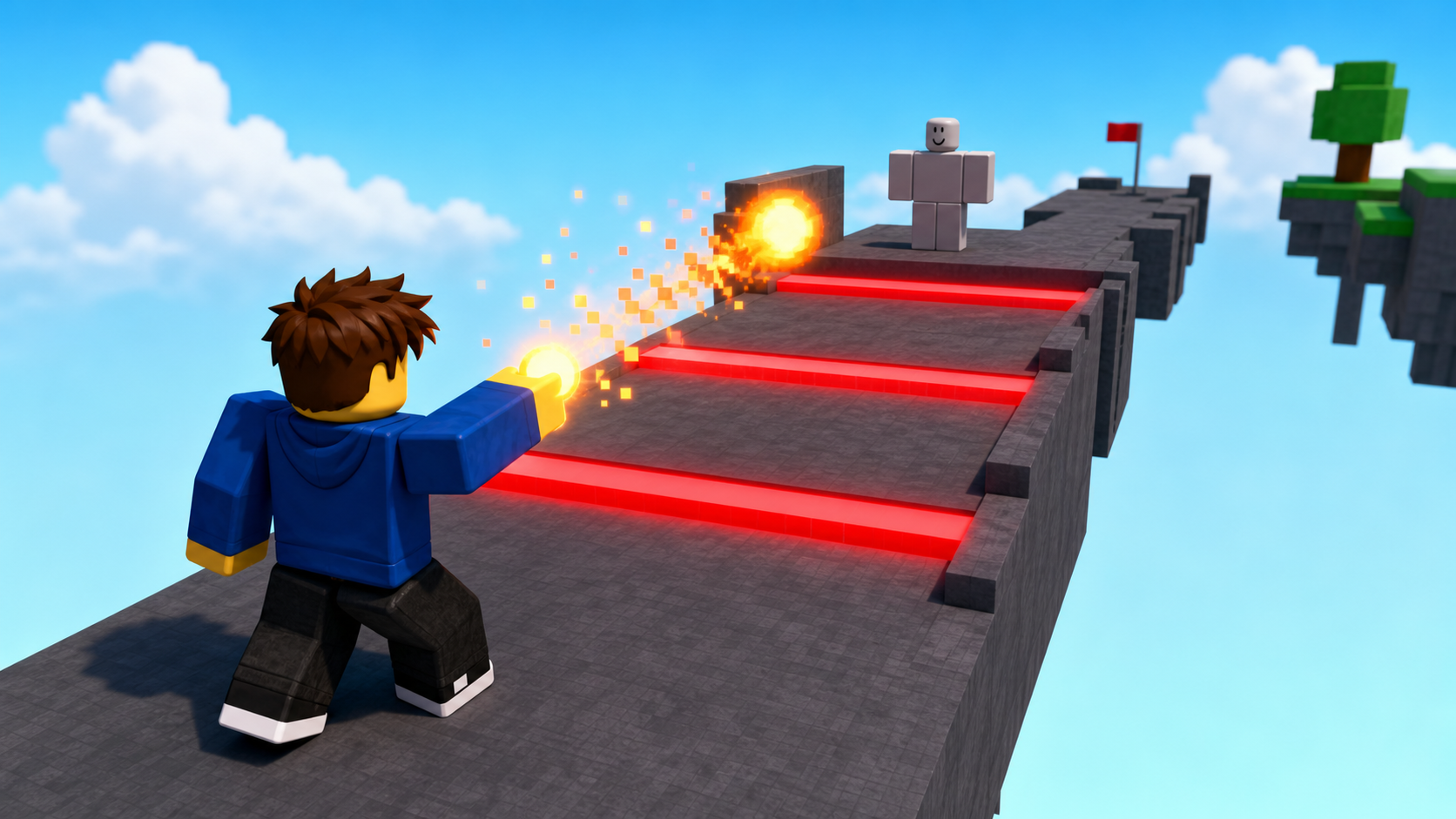
First, a safe path to walk on:
Build this partHazardPath
BlockOpen recipe
HazardPath
Block- Size
- 8 × 1 × 30
- Color
- Dark stone grey
- Material
- Concrete
- Anchored
- ✓ Yes
- Place
- Stretching forward from the Stage 4 green pad
Then three danger bricks sitting on the path, with gaps to dodge between:
Build this partKillBrick_1
BlockOpen recipe
KillBrick_1
Block- Size
- 8 × 1 × 3
- Color
- Really red
- Material
- Neon
- Anchored
- ✓ Yes
- Place
- Across HazardPath, about a third of the way along
Build this partKillBrick_2
BlockOpen recipe
KillBrick_2
Block- Size
- 8 × 1 × 3
- Color
- Really red
- Material
- Neon
- Anchored
- ✓ Yes
- Place
- Across HazardPath, about halfway along
Build this partKillBrick_3
BlockOpen recipe
KillBrick_3
Block- Size
- 8 × 1 × 3
- Color
- Really red
- Material
- Neon
- Anchored
- ✓ Yes
- Place
- Across HazardPath, about two-thirds along
Now make the red bricks dangerous. In ServerScriptService, insert a Script named KillBricks and type:
local Players = game:GetService("Players")

for _, part in ipairs(workspace:GetChildren()) do
  if part.Name:sub(1, 9) == "KillBrick" then
    part.Touched:Connect(function(otherPart)
      local humanoid = otherPart.Parent:FindFirstChildOfClass("Humanoid")
      local player = Players:GetPlayerFromCharacter(otherPart.Parent)
      if humanoid and player then
        humanoid.Health = 0
      end
    end)
  end
end
Press Play. Walk into a red brick — you reset to the checkpoint. Dodge between them to cross.
Step 2 — Wire the Stage 5 checkpoint
Build this partSpawnLocation (Stage 5 — end of the hazard path)
BlockOpen recipe
SpawnLocation (Stage 5 — end of the hazard path)
Block- Size
- 6 × 1 × 6
- Color
- Bright yellow
- Material
- Plastic
- Anchored
- ✓ Yes
- Place
- At the far end of HazardPath
Add StageNumber = 5. Check AllowTeamChangeOnTouch. Uncheck Neutral. Set TeamColor to Bright yellow.
Same gesture: StageNumber = 5 attribute and a Stage 5 Team (Bright yellow, AutoAssignable unchecked).
Step 3 — Build the RemoteEvent mailbox
The client and server need a shared mailbox. It goes in ReplicatedStorage, the one place both can see.
- In Explorer, right-click ReplicatedStorage → Insert Object → RemoteEvent.
- Rename it CastFireball (exact spelling — both scripts look for this name).
Step 4 — Build the fireball power
You'll write two scripts that talk through the mailbox, in three passes.
Pass 1 — The client notices the key press
The script that reads keys must be a LocalScript, and it lives in StarterPlayerScripts.
- In Explorer, expand StarterPlayer, right-click StarterPlayerScripts → Insert Object → LocalScript.
- Rename it
FireballClient. Type:
local UserInputService = game:GetService("UserInputService")
local ReplicatedStorage = game:GetService("ReplicatedStorage")
local castFireball = ReplicatedStorage:WaitForChild("CastFireball")

local player = game.Players.LocalPlayer
local mouse = player:GetMouse()

UserInputService.InputBegan:Connect(function(input, typing)
  if typing then return end
  if input.KeyCode == Enum.KeyCode.F then
    print("F pressed — sending fireball request")
    castFireball:FireServer(mouse.Hit.Position)
  end
end)
Now the server side, so you can see the message arrive. In ServerScriptService, insert a Script named FireballServer:
local ReplicatedStorage = game:GetService("ReplicatedStorage")
local castFireball = ReplicatedStorage:WaitForChild("CastFireball")

castFireball.OnServerEvent:Connect(function(player, targetPosition)
  print("Server got a fireball request from", player.Name)
end)
Press Play and press F. Output prints both lines — the client's "sending" and the server's "got a request." The mailbox works. Stop.
Pass 2 — The server spawns a flying fireball
Replace the body of OnServerEvent in FireballServer with this:
local ReplicatedStorage = game:GetService("ReplicatedStorage")
local castFireball = ReplicatedStorage:WaitForChild("CastFireball")

castFireball.OnServerEvent:Connect(function(player, targetPosition)
  local character = player.Character
  if not character then return end
  local root = character:FindFirstChild("HumanoidRootPart")
  if not root then return end

  local fireball = Instance.new("Part")
  fireball.Shape = Enum.PartType.Ball
  fireball.Size = Vector3.new(2.5, 2.5, 2.5)
  fireball.Color = Color3.fromRGB(255, 120, 0)
  fireball.Material = Enum.Material.Neon
  fireball.CanCollide = false
  fireball.Position = root.Position + root.CFrame.LookVector * 4 + Vector3.new(0, 2, 0)
  fireball.Parent = workspace

  local offset = targetPosition - fireball.Position
  if offset.Magnitude < 1 then
    fireball:Destroy()
    return
  end
  local direction = offset.Unit
  fireball.AssemblyLinearVelocity = direction * 70
end)
Press Play, aim, press F. A glowing orange ball launches from in front of you and flies toward your aim point. It doesn't hurt anything yet. Stop.
Pass 3 — Add fire particles, damage, and cleanup
Add this inside OnServerEvent, after the velocity line:
  local Debris = game:GetService("Debris")

  local fire = Instance.new("ParticleEmitter")
  fire.Color = ColorSequence.new(Color3.fromRGB(255, 170, 0))
  fire.Lifetime = NumberRange.new(0.3)
  fire.Rate = 80
  fire.Speed = NumberRange.new(2)
  fire.Parent = fireball

  local hasHit = false
  fireball.Touched:Connect(function(otherPart)
    if hasHit then return end
    if otherPart:IsDescendantOf(character) then return end

    local humanoid = otherPart.Parent:FindFirstChildOfClass("Humanoid")
    if humanoid then
      hasHit = true
      humanoid:TakeDamage(40)
    end
    fireball:Destroy()
  end)

  Debris:AddItem(fireball, 4)
Press Play. Aim at the dummy, press F. The fireball trails fire, slams into the dummy, deals 40 damage, and pops. Aim at a wall — it flies, hits, and vanishes. Any fireball that hits nothing deletes itself after 4 seconds so the world doesn't fill with old fireballs.
Understand it
The client/server split is the whole lesson. Only a LocalScript can read UserInputService, so the key press must start on the client. But damage must be decided on the server, because the client isn't trusted. The RemoteEvent is the only honest way across: the client says "I'd like to cast," and the server decides what actually happens. Every power, ability, and shop purchase in serious Roblox games works exactly this way.
The server builds the fireball, not the client, so every player sees the same fireball. If the client spawned it, only that one player would see it — the others would watch you press F and nothing would appear. Server-created parts replicate to everyone automatically.
The hasHit flag is a debounce again — the same problem as the sword. A fast-moving ball can register several Touched events in one frame, so without the flag a single fireball could deal 40 damage many times. It deals damage once, then destroys itself.
The Debris:AddItem line is good housekeeping. A fireball that sails past everything would otherwise live forever, and hundreds of them would lag the game. Debris deletes it after 4 seconds.
The server half of the fireball power
When the RemoteEvent fires, the server spawns a glowing ball at the caster, sends it toward the aim point, and makes it deal damage once before cleaning up.
castFireball.OnServerEvent:Connect(function(player, targetPosition)
local character = player.Character
if not character then return end
local root = character:FindFirstChild("HumanoidRootPart")
if not root then return end

local fireball = Instance.new("Part")
fireball.Shape = Enum.PartType.Ball
fireball.Material = Enum.Material.Neon
fireball.CanCollide = false
fireball.Position = root.Position + root.CFrame.LookVector * 4 + Vector3.new(0, 2, 0)
fireball.Parent = workspace

local offset = targetPosition - fireball.Position
if offset.Magnitude < 1 then
  fireball:Destroy()
  return
end
local direction = offset.Unit
fireball.AssemblyLinearVelocity = direction * 70

local hasHit = false
fireball.Touched:Connect(function(otherPart)
  if hasHit then return end
  if otherPart:IsDescendantOf(character) then return end
  local humanoid = otherPart.Parent:FindFirstChildOfClass("Humanoid")
  if humanoid then
    hasHit = true
    humanoid:TakeDamage(40)
  end
  fireball:Destroy()
end)

game:GetService("Debris"):AddItem(fireball, 4)
end)
Lines 1–5Who cast it, and from where?
OnServerEvent always passes the player first, then whatever the client sent (the aim point). Find their character and HumanoidRootPart so the fireball starts at them.
Lines 7–13Build the fireball on the server.
A Neon ball with collisions off, spawned just in front of the caster. Because the server makes it, every player sees it.
Lines 15–16Aim it.
Subtract positions to get a direction, .Unit shrinks it to length 1, times 70 sets the speed. AssemblyLinearVelocity launches the ball that way.
Lines 18–29Damage once, then clean up.
The hasHit flag stops repeat damage. Skip the caster's own body, deal 40 to a Humanoid, destroy the ball. Debris deletes any fireball that hits nothing after 4 seconds.
Try this
Try this
Three short experiments. Predict before you run, then test your guess.
The fireball is built by the server. Predict what other players would see if you moved the Instance.new("Part") code into the LocalScript instead. Why does spawning it on the server matter for a multiplayer fight?
Change the speed from 70 to 30, press Play, and fire. Then try 150. Compare how each feels to aim. Faster is easier to land but the fire trail is harder to see — which speed reads best?
The fireball can be spammed as fast as you can press F. In Stage 5 you'll add a cooldown so it can't. Where would a "wait before you can cast again" check live — on the client, the server, or both? Why both?
Test your stage
- Press ▶ Play. Dodge between the KillBricks to cross the path; touching one resets you.
- Reach the Stage 5 yellow pad.
- Aim at the dummy and press F. A glowing fireball launches and trails fire.
- The fireball hits the dummy, deals 40 damage, and pops.
- A fireball aimed at empty space deletes itself after a few seconds.
- Output (Pass 1) showed both the client and server messages.
- Design check. 40 damage from a fireball vs 25 from a sword swing — does the power feel stronger than the basic weapon? A power should feel worth the key press.
If it breaks
- Pressing F does nothing. The
FireballClientscript must be a LocalScript inside StarterPlayerScripts — a regular Script there won't read input. Also confirm the RemoteEvent is named exactlyCastFireball. - Output shows the client line but not the server line. The RemoteEvent name doesn't match in one of the scripts, or
FireballServerisn't in ServerScriptService. - The fireball appears but doesn't move. The velocity line is missing or runs before the part is parented. Parent the fireball to workspace before setting its velocity.
- The fireball falls to the ground instead of flying straight. That's gravity — a little arc is normal. Increase the speed to flatten the arc, or see the Stretch challenge to remove gravity.
- The fireball hurts me. The
if otherPart:IsDescendantOf(character) then return endguard is missing or the fireball spawns inside you. Push the spawn point further with a biggerLookVector * 4.
This is the conceptual peak of the course. Spend real time on Pass 1 — the two print statements proving a message crossed from client to server is the single most important thing campers learn here. Don't rush to the visual fireball before that lands.
- The most common bug is a regular Script (not LocalScript) in StarterPlayerScripts, or the LocalScript placed in StarterPack/Workspace. Input only works from a LocalScript in a client location.
- If a camper asks "why not just damage on the client?" — that's the perfect question. Answer: a cheater can edit their client, but not the server.
- Total time: 60 minutes. KillBrick path + script 15, checkpoint 5, RemoteEvent 5, three-pass power 35.