Stage 2: Sphere Staircase + XP and leveling
Finish Stage 1. You spawn holding a sword, and the top-right shows Level 1 and XP 0. Your CombatStats script lives in ServerScriptService.
a staircase of spheres, the Stage 3 checkpoint, and the XP-and-leveling system
how to award XP by looping over every checkpoint by its StageNumber, and how a level-up loop converts XP into Levels
checkpoints that pay XP, and a Level that climbs and announces itself when you cross the XP threshold
90-second demo:
- Press Play. Top-right shows
Level 1,XP 0. - Climb the spheres and touch the next checkpoint. XP jumps up.
- Keep reaching checkpoints until XP crosses the threshold — the Level ticks to 2 and XP resets toward the next level.
- Explain: "That's the whole loop of every RPG. Fight, earn XP, level up. Today the obby itself pays the XP; later, enemies will."
The big idea
In Stage 1 the XP number just sat at 0. An RPG is boring if the numbers never move — so today they start moving.
Two ideas do the work. First, awarding XP: every checkpoint pays the player some XP when they reach it. Instead of writing one block of code per checkpoint, you write one loop that finds every SpawnLocation by its StageNumber attribute and wires them all the same way. One loop, every pad — that's the same trick the base obby uses for checkpoints, now paying XP.
Second, leveling up: XP isn't meant to grow forever. When it crosses a threshold, the player gains a Level and the XP "spends down" toward the next one. The threshold gets bigger each level, so higher levels take more XP — exactly like the games you're copying.
- GetAttribute
- reads the value of an attribute you added in Properties, like StageNumber
- ipairs loop
- walks through a list in order; we use it to visit every part in Workspace
- GetPlayerFromCharacter
- looks up which player owns a character that touched something — Touched gives a body part, not a player
- debounce
- a flag that stops the same event from firing too many times in a row; here, so each pad only pays once
- threshold
- the amount of XP needed to reach the next Level; ours grows each level so leveling gets harder
- while loop
- repeats as long as a condition is true; we use one to handle leveling up more than once from a big XP gain
Build it
Step 1 — Build the sphere staircase
A climb made of spheres instead of blocks. Rolling off the edge is part of the challenge.
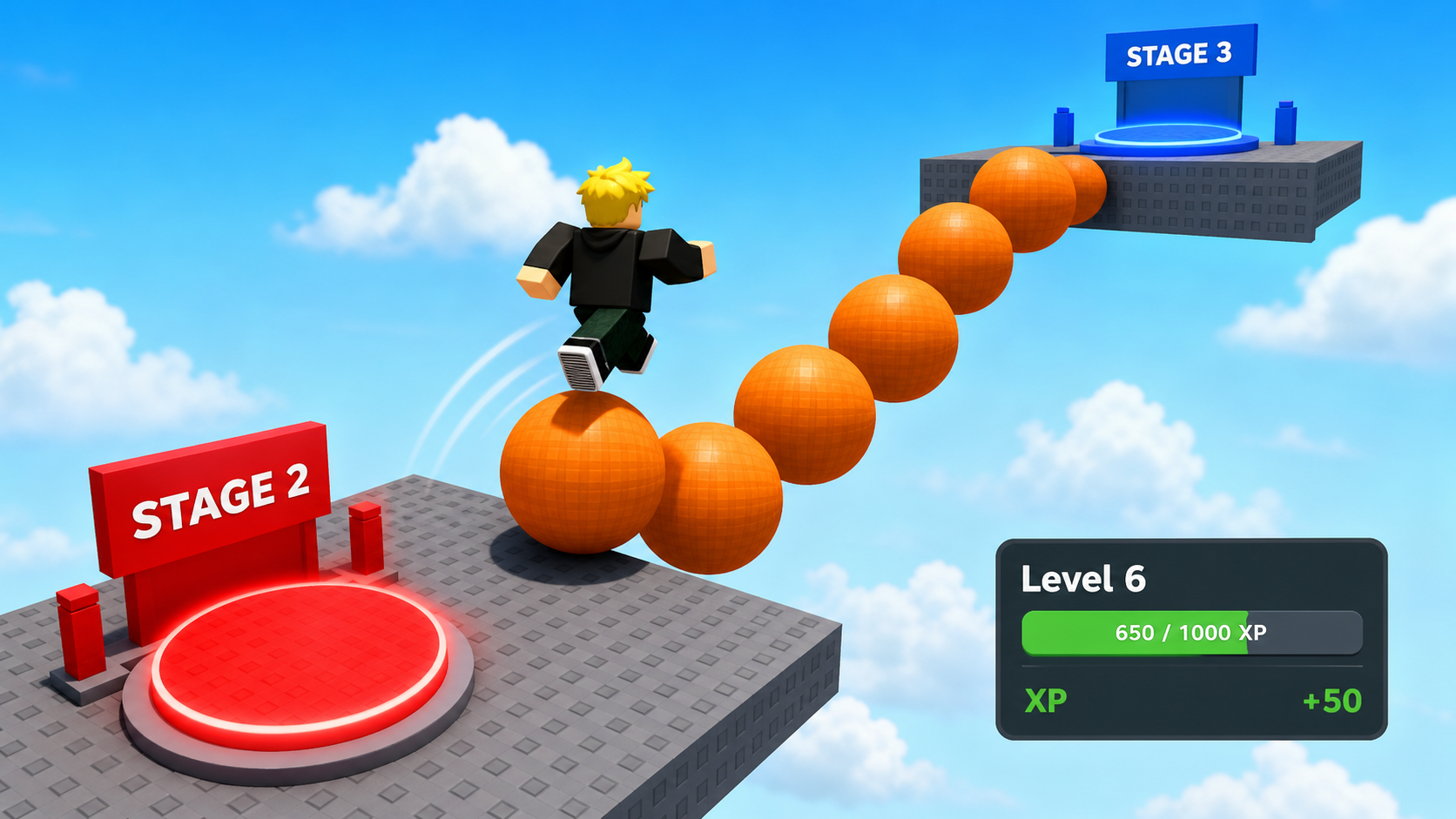
Build this partStepSphere_1
SphereOpen recipe
StepSphere_1
Sphere- Size
- 5 × 5 × 5
- Color
- Bright orange
- Material
- Plastic
- Anchored
- ✓ Yes
- Place
- In front of the Stage 2 red pad, low
Build this partStepSphere_2
SphereOpen recipe
StepSphere_2
Sphere- Size
- 5 × 5 × 5
- Color
- Bright orange
- Material
- Plastic
- Anchored
- ✓ Yes
- Place
- A short hop up and forward from StepSphere_1
Build this partStepSphere_3
SphereOpen recipe
StepSphere_3
Sphere- Size
- 5 × 5 × 5
- Color
- Bright orange
- Material
- Plastic
- Anchored
- ✓ Yes
- Place
- A short hop up and forward from StepSphere_2
Add a couple more if you want a longer climb. Press Play and confirm you can hop sphere to sphere.
Step 2 — Wire the Stage 3 checkpoint
Same checkpoint pattern as before. Place the SpawnLocation at the top of the spheres.
Build this partSpawnLocation (Stage 3 — top of the spheres)
BlockOpen recipe
SpawnLocation (Stage 3 — top of the spheres)
Block- Size
- 6 × 1 × 6
- Color
- Bright blue
- Material
- Plastic
- Anchored
- ✓ Yes
- Place
- On top of the highest sphere
Add a StageNumber attribute = 3. Check AllowTeamChangeOnTouch. Uncheck Neutral. Set TeamColor to Bright blue.
Same gesture as Stage 1: add the StageNumber = 3 attribute, then make a matching Stage 3 Team (Bright blue, AutoAssignable unchecked).
Step 3 — Award XP from every checkpoint
Open your CombatStats script in ServerScriptService. You'll add the XP system in three passes, below the PlayerAdded block you wrote in Stage 1.
Pass 1 — A helper that adds XP and levels up
Add this above the Players.PlayerAdded line:
local function xpNeeded(level)
  return level * 100
end

local function addXP(player, amount)
  local stats = player:FindFirstChild("leaderstats")
  if not stats then return end

  stats.XP.Value = stats.XP.Value + amount

  while stats.XP.Value >= xpNeeded(stats.Level.Value) do
    stats.XP.Value = stats.XP.Value - xpNeeded(stats.Level.Value)
    stats.Level.Value = stats.Level.Value + 1
    print(player.Name, "leveled up to", stats.Level.Value)
  end
end
This doesn't run yet — it's a helper, waiting to be called. Press Play to confirm there are no typos in Output (no red errors). Stop.
Pass 2 — Find every checkpoint and pay XP on touch
Add this below the Players.PlayerAdded block:
local awarded = {}

Players.PlayerRemoving:Connect(function(player)
  awarded[player] = nil
end)

for _, part in ipairs(workspace:GetChildren()) do
  if part:IsA("SpawnLocation") and part:GetAttribute("StageNumber") then
    local stageNumber = part:GetAttribute("StageNumber")

    part.Touched:Connect(function(otherPart)
      local character = otherPart.Parent
      local player = Players:GetPlayerFromCharacter(character)
      if not player then return end

      awarded[player] = awarded[player] or {}
      if awarded[player][part] then return end
      awarded[player][part] = true

      addXP(player, stageNumber * 10)
      print(player.Name, "reached stage", stageNumber, "and earned", stageNumber * 10, "XP")
    end)
  end
end
Press Play. Climb the spheres, touch the blue pad. XP jumps by 30 (Stage 3 pays 3 × 10). Touch it again — nothing, because the awarded table debounced it.
Pass 3 — Watch a level-up happen
You don't add code for this pass — you test the threshold. Level 1 needs 100 XP. Reaching Stage 2's pad pays 20, Stage 3's pays 30. Keep reaching checkpoints (and reset between them so you can re-touch earlier pads is not allowed — the debounce blocks repeats). To force a level-up now, temporarily lower the threshold:
Change xpNeeded to return level * 30 and press Play. After two or three checkpoints, watch Output print "PlayerN leveled up to 2" and the top-right Level tick up. Then set it back to level * 100 — the real curve.
Understand it
The one-loop-for-every-pad pattern is the heart of this stage. You didn't write Stage 2's pad and Stage 3's pad separately — you wrote a loop that finds anything that is a SpawnLocation with a StageNumber, and wired all of them at once. When you add Stage 4's pad next stage, this loop already covers it. That's why Setup made you tag every pad with the attribute.
The addXP helper keeps the leveling logic in one place. Anything that should grant XP — a checkpoint now, a defeated enemy later, a loot orb after that — just calls addXP(player, amount). The level-up rules live in exactly one function, so when you tune them, you tune them once.
The while loop inside addXP matters more than it looks. If a player earns a huge chunk of XP — enough for two levels at once — a single if would only level them up once and leave the extra XP stranded. A while keeps spending XP and adding Levels until there isn't enough left for another, so big XP gains level you up correctly every time.
How a checkpoint touch becomes XP and a Level
The XP system is two pieces: a helper that converts XP into Levels, and a loop that calls it whenever a player touches a checkpoint.
local function xpNeeded(level)
return level * 100
end

local function addXP(player, amount)
local stats = player:FindFirstChild("leaderstats")
if not stats then return end

stats.XP.Value = stats.XP.Value + amount

while stats.XP.Value >= xpNeeded(stats.Level.Value) do
  stats.XP.Value = stats.XP.Value - xpNeeded(stats.Level.Value)
  stats.Level.Value = stats.Level.Value + 1
end
end

local awarded = {}

Players.PlayerRemoving:Connect(function(player)
awarded[player] = nil
end)

for _, part in ipairs(workspace:GetChildren()) do
if part:IsA("SpawnLocation") and part:GetAttribute("StageNumber") then
  local stageNumber = part:GetAttribute("StageNumber")
  part.Touched:Connect(function(otherPart)
    local player = Players:GetPlayerFromCharacter(otherPart.Parent)
    if not player then return end
    awarded[player] = awarded[player] or {}
    if awarded[player][part] then return end
    awarded[player][part] = true
    addXP(player, stageNumber * 10)
  end)
end
end
Lines 1–3The XP curve.
xpNeeded(level) returns how much XP this level requires. level * 100 means Level 1 needs 100, Level 2 needs 200, and so on — higher levels take more.
Lines 5–17Add XP, then level up as many times as earned.
Bump XP, then the while loop spends XP and raises the Level repeatedly until there isn't enough for the next level. One call handles a tiny gain or a giant one.
Lines 19–21Find every checkpoint at once.
Loop over Workspace; for each SpawnLocation that has a StageNumber, wire it. This automatically covers every pad you've built and every pad you'll add later.
Lines 22–31Pay XP once per pad per player.
On touch, find the player, then use a nested table as a debounce so each player is paid only the first time they reach each pad. The payout scales with the pad's StageNumber.
Try this
Try this
Three short experiments. Predict before you run, then test your guess.
Predict what xpNeeded(3) returns with the level * 100 curve. Then predict how many checkpoints a fresh player must reach to hit Level 2. Check your math against Output.
Change addXP(player, stageNumber * 10) to addXP(player, 100) so every pad pays a flat 100. Press Play and compare how fast you level. Which feels more like a real RPG — flat XP or XP that scales with the stage?
The addXP helper doesn't care who calls it. In Stage 3 your sword will damage a dummy, and in Stage 8 a defeated enemy will drop loot. Which of those should also call addXP? What amount would feel fair for defeating an enemy?
Test your stage
- Press ▶ Play. Top-right shows
Level 1,XP 0. - Climb the spheres and touch the blue Stage 3 pad. XP jumps by 30.
- Touch the same pad again — XP does not change (the debounce works).
- With the threshold temporarily lowered, reach enough checkpoints to see Output print a level-up and the Level tick up.
- Set
xpNeededback tolevel * 100. - Design check. Does leveling up feel like a reward? Right now it's just a number change in Output. Notice if it lands — Stage 6's health bars and later polish are what make it feel big.
If it breaks
- XP never changes. The loop didn't find your pads. Confirm each SpawnLocation has a
StageNumberattribute with a number value. Output's print in Pass 2 tells you which stage was reached. - XP goes up but Level never does. Your XP hasn't crossed
xpNeeded(level)yet, or thewhilecondition is wrong. Lower the curve temporarily (Pass 3) to confirm leveling works. - The Level jumps up forever / freezes Studio. Your
whileloop never subtracts XP. Make sure the linestats.XP.Value = stats.XP.Value - xpNeeded(stats.Level.Value)is inside the loop — without it the condition stays true and the loop spins forever. - Output says
attempt to index nil with 'XP'. A player without a leaderstats folder reached the pad. Theif not stats then return endguard at the top ofaddXPis what prevents this — make sure it's there.
The conceptual leap this stage is "one loop wires every pad." Campers who took Tycoon will recognize it; for everyone else, slow down on Pass 2 and point out that adding a new checkpoint later needs zero new code here.
- The
whilevsifdistinction inaddXPis the subtle bit. Demonstrate it: temporarily calladdXP(somePlayer, 1000)and show that awhileloop levels them up several times while anifwould not. - Watch for campers who lower the threshold in Pass 3 and forget to set it back. The real curve is
level * 100. - Total time: 50 minutes. Sphere climb 15, checkpoint 5, three-pass script 30 (the helper and the loop each need a careful read).