Stage 6: Hidden Hazard Field
Finish Stage 5: Fireball Cannon first. You have a bluish-green checkpoint past the cannons, and you've written a 25-line script that spawns fireballs.
a wide field with multiple flat hazard tiles tuned to be barely visible, plus the seventh checkpoint
how `Transparency` is a fairness dial, and how an `if/else` branch can change behavior based on script state
a hazard that reveals itself the first time it kills you — turning the second run into a different stage
The big idea
Stage 4 made every hazard obviously red. Stage 6 flips the design.
These hazards are barely visible. The player has to read the floor carefully.
The fairness dial is Transparency. 0 is visible. 1 is invisible. 0.85 is faint, but still readable.
The scripting lesson is state. Each hazard remembers whether it has already been revealed.
On the first touch, it kills and becomes visible. Later touches still kill, but the tile stays visible.
Invisible danger is cheating. Faint danger is fair. Game designers call this telegraphing.
- Transparency
- a property from 0 (opaque) to 1 (invisible); 0.85 is the fairness sweet spot for hidden hazards
- if/else
- Lua's conditional branch — runs one block if a condition is true, another if false
- state variable
- a local variable the script reads and writes across multiple events — like a memory
- telegraphing
- a game-design term for giving the player a visual hint that danger is here, even subtle
- Color3.fromRGB
- creates a color from red, green, blue values (0-255) — useful for blending hazards with the floor
Build it
Step 1 — Build the wide hazard field
A big flat area. The whole point is that there's space — multiple routes through. Hazards are scattered, not lined up.
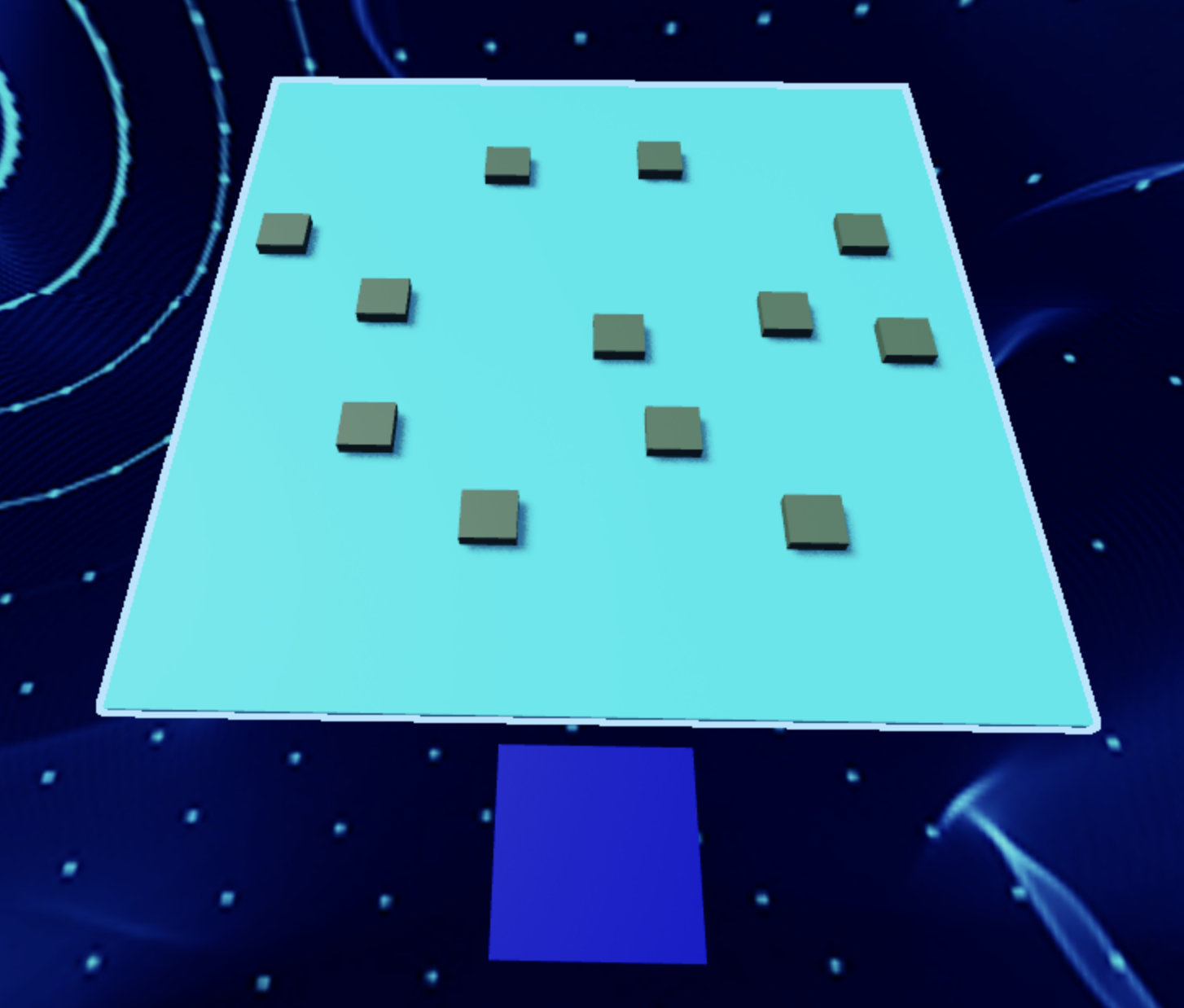
Build this partHazardField
BlockOpen recipe
HazardField
Block- Size
- 20 × 1 × 30
- Color
- Sand stone
- Material
- Sand
- Anchored
- ✓ Yes
- Place
- Starting at the Stage 6 bluish-green pad, stretching forward
20 studs wide is wide enough that the player must read the layout, not just walk in a straight line.
Step 2 — Build the hidden hazards
Hazards are flat tiles you walk over. They sit just above the field so they're separate parts, but their color blends with the floor so they're hard to see.
Build this partHazard_1
BlockOpen recipe
Hazard_1
Block- Size
- 3 × 0.2 × 3
- Color
- Sand stone
- Material
- Sand
- Anchored
- ✓ Yes
- Place
- On HazardField, in the middle area
Tile thickness 0.2 — just barely raised. Same Color and Material as the field for visual blending. We'll tune Transparency in the script.
Duplicate Hazard_1 four times so you have five hazards total. Scatter them across the field — leave at least one safe corridor visible from the starting pad, but don't make it obvious.
Step 3 — Add the seventh checkpoint
Build this partSpawnLocation (Stage 7 — past the hazard field)
BlockOpen recipe
SpawnLocation (Stage 7 — past the hazard field)
Block- Size
- 6 × 1 × 6
- Color
- Bright purple
- Material
- Plastic
- Anchored
- ✓ Yes
- Place
- At the far end of HazardField
Also: check AllowTeamChangeOnTouch. Uncheck Neutral. Set TeamColor to Bright purple. In Teams, insert a Team named 'Stage 7', uncheck AutoAssignable, set its TeamColor to match.
Step 4 — Write the reveal-on-kill hazard script
The script lives in Hazard_1.
It tracks whether this tile has been triggered before. On touch, it kills the player and reveals itself.
Right-click Hazard_1 → Insert Object → Script. Open the editor.
Pass 1 — Set initial transparency and add the kill handler
local hazard = script.Parent

-- Start out faint but visible (the fairness dial)
hazard.Transparency = 0.85

local revealed = false

hazard.Touched:Connect(function(otherPart)
  local character = otherPart.Parent
  local humanoid = character:FindFirstChildOfClass("Humanoid")

  if humanoid then
    if not revealed then
      print("First touch — revealing hazard")
      hazard.Transparency = 0
      revealed = true
    else
      print("Subsequent touch — already revealed")
    end

    humanoid.Health = 0
  end
end)
Press Play. Walk onto Hazard_1.
Output prints "First touch — revealing hazard". The tile becomes visible, and you respawn.
Walk onto it again. Output prints "Subsequent touch — already revealed". You still die, but the tile was already visible.
The script remembers.
Pass 2 — Apply to all hazards (copy script across)
Drag the Script in Explorer from Hazard_1 onto Hazard_2, Hazard_3, Hazard_4, Hazard_5. Each one is independent — they each track their own revealed state. First touch on any of them reveals just that one.
Press Play. The field has five faint tiles. Walking the field is risky. Touching any tile reveals it permanently for that game session — which makes the second attempt easier.
Understand it
The revealed local variable is a state variable. It is memory the script keeps between touches.
The first touch sees revealed == false, reveals the tile, then sets revealed = true. Later touches skip the reveal because the tile already remembers.
The if not revealed then ... else ... end branch chooses first-touch behavior or later-touch behavior.
The kill line sits after that branch, so it runs either way. The memory changes what the tile looks like; it does not make the tile safe.
Why Transparency = 0.85 is the design hinge. We tried other values:
Transparency = 1(invisible): the player has no visual signal. They walk into death with no warning. Cheating.Transparency = 0.5: the tile is half-faded but obviously there. The player avoids it on the first walkthrough. No challenge.Transparency = 0.85: the tile is almost invisible but a careful player can spot it as a subtle outline. First-time players sometimes walk into it; repeat players avoid it.
The fairness sweet spot is usually between 0.7 and 0.9. Tune it by playing with fresh eyes.
The reveal-on-touch behavior changes the second run.
First time through, you may die while finding hazards. Second time through, the visible tiles help you plan. Losing teaches you, so the win feels earned.
How this script remembers whether a hazard was found
This script adds memory. The hazard does not just react to one touch; it remembers whether this is the first time it has been triggered.
local hazard = script.Parent

hazard.Transparency = 0.85

local revealed = false

hazard.Touched:Connect(function(otherPart)
  local character = otherPart.Parent
  local humanoid = character:FindFirstChildOfClass("Humanoid")

  if humanoid then
    if not revealed then
      print("First touch — revealing hazard")
      hazard.Transparency = 0
      revealed = true
    else
      print("Subsequent touch — already revealed")
    end

    humanoid.Health = 0
  end
end)
Lines 1–3Find the hazard and set its starting clue.
`hazard` is the tile this Script lives inside. Setting Transparency in code makes the hazard faint when Play starts. It is hidden enough to be risky, but visible enough that the game is not unfair.
Line 5Create the memory variable.
`revealed` starts as false because nobody has discovered this tile yet. Later the script changes it to true. That one variable is how the tile remembers what happened before.
Lines 7–9Use the familiar touch-to-player check.
This is the Stage 4 pattern again: wait for a touch, move from body part to character, and look for a Humanoid. If there is no Humanoid, the reveal and kill logic does not run.
Lines 11–18Choose first-touch behavior or later-touch behavior.
On the first player touch, `not revealed` is true, so the tile becomes visible and `revealed` flips to true. On later touches, the else branch runs. The Output messages let learners see which path the script chose.
Line 20The hazard still kills every time.
This line sits after the first-touch/else decision, so it runs for both cases. The memory changes what the tile looks like; it does not make the tile safe.
Try this
Try this
Three short experiments. Predict before you run, then test your guess.
Change line 3 to hazard.Transparency = 1. Now the hazards are completely invisible on first run. Walk the field — predict how many times you'll die before reaching the purple pad. Then count. Was your prediction right?
Make one hazard use hazard.Color = Color3.fromRGB(180, 60, 60) (a faint reddish hue) instead of matching the field's sandstone. Keep Transparency = 0.85. Walk the field. Which hazard do you spot first, the matching one or the off-color one? Why does this matter for design?
The revealed state variable is the simplest possible memory a script can have. Stage 10's puzzle room uses a similar idea (a currentIndex that remembers which button comes next). What other in-game states could a script remember? Coin count? Door open/closed? Player powerups?
Test your stage
- All five hazards are faintly visible (Transparency around 0.85) but clearly distinguishable from the field with careful looking.
- Touching any hazard kills you; you respawn on the bluish-green pad.
- After a hazard kills you once, it stays fully visible for the rest of the play session.
- You can reach the purple pad by reading the field carefully.
- Output prints "First touch — revealing hazard" the first time you hit each, and "Subsequent touch — already revealed" after.
- Design check. Ask a friend who hasn't played to walk the field. How many times do they die before reaching the end? If more than 4 — the field is unfair (raise Transparency to 0.7 to make hazards more visible). If 0 — the field is too easy (lower to 0.9).
If it breaks
- Hazards are fully visible from the start, not faint. Line 3 isn't running. Check that the script is actually inside the hazard, not at Workspace level. Or check that you didn't override Transparency in the Properties panel afterward (the script runs at game-start; if you set Transparency to 0 in Properties after, the script-set value won the race but the Properties panel shows your manual value).
- Hazards are completely invisible. You probably typed
1instead of0.85. Or the script crashed before setting transparency — open Output and read any red error messages. - Touching a hazard doesn't kill me. Same checklist as Stage 4: script is inside the part? Humanoid check spelled correctly?
humanoid.Health = 0and notHealth.0 = humanoid? - The reveal happens but it doesn't persist between play sessions. The
revealedvariable is per-script — when you stop and restart Play, every script'srevealedresets to false. That's correct behavior. Saving state between separate play sessions is a later Roblox topic. - All five hazards reveal at once when I touch any one. You probably wrote the script with
revealedas a global instead of a local, or all hazards share the same Script object. Each hazard needs its own Script — copy by dragging in Explorer, not by reference.
The fairness conversation is the lesson here, more than the script. Spend 5 minutes after Step 4 having campers try Transparency = 1, Transparency = 0.5, and Transparency = 0.85 and feel the difference. They'll get the script working in 15 minutes; the design intuition takes the full 40.
- Some campers will set every hazard to a different color to "make them obvious." That defeats the stage. Steer them back: same color as the field, only Transparency varies.
- The
if not revealed then … else … endsyntax is the first time campers see a real conditional with two branches. Expect typos — missingend, missingthen,else ifinstead ofelseif. Show them how Output errors point to the exact line. - Common mistake: campers comment out the
humanoid.Health = 0line during testing and forget to uncomment it. Tip-off: they say "the hazard reveals but doesn't kill."