Stage 6: Follow the Line
We code the mBot in mBlock 5. Keep this tab open all week. Open in a new tab — don’t use the buttons in this page to leave the course.
a robot that drives along a black line all by itself
how two sensors and a few rules make the robot steer to stay on a path
an mBot that follows your printed track from start to finish
Before campers code, show the room:
- Hold the robot over the line and over the white paper. Show the two LEDs lighting up to match what each sensor sees. Say: "The robot can tell black from white — that's all it needs."
- Set it on the line with the follow program. It steers along the curve. Nudge it off the line and watch it steer back.
- Name the trick: "It isn't following the line. It's noticing when it drifts off and correcting. That's how all line robots work."
The big idea
Your mBot has a second sensor underneath the front: the line sensor. It has two little eyes that look down at the floor and tell black from white. A black line on white paper gives the robot a path it can follow.
Here is the secret: the robot does not really "follow" the line. It watches for the moment it drifts off, and it steers back. Two eyes make this possible — if the left eye finds black, the robot has drifted right, so it turns left to recenter. If the right eye finds black, it turns right. When both eyes are on the line, it goes straight. Check that, over and over, and the robot hugs the line all the way around.
   both eyes on the line  →  go straight
   left eye on the line   →  steer left
   right eye on the line  →  steer right
   both eyes on white     →  lost — slow down / search
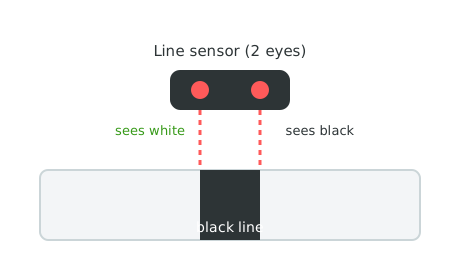
Two downward eyes, each answering one question: am I over black, or over white?
- line sensor
- two eyes under the robot that tell black from white
- drift
- slowly sliding off the path to one side
- correct
- steering back toward the line
- and
- a question that is true only when both parts are true
Make sure you've finished Stage 5: Don't Crash. Print the track below and tape it flat to the floor — bumps and curls will throw the robot off.
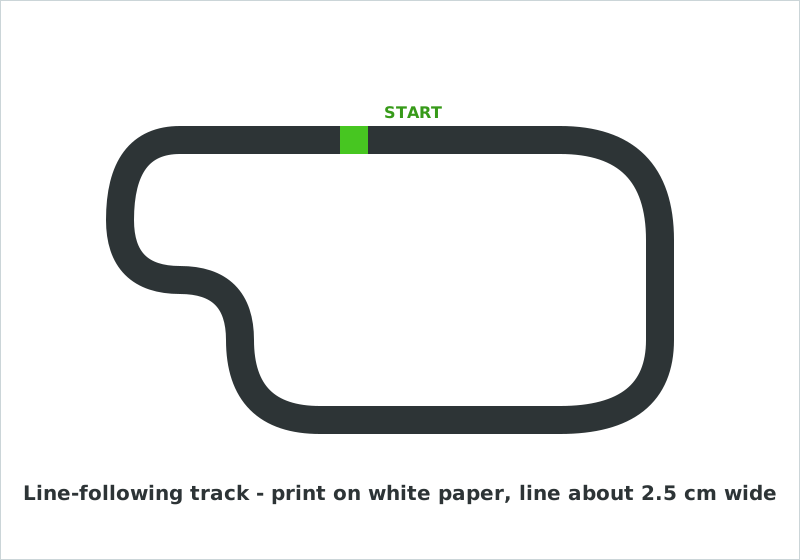
Print it, tape it flat, and start your robot with both sensors over the green START square. A line about 2.5 cm wide works best.
Build it
Step 1 — See what each eye sees
First, prove the sensors work. Make each LED match the eye on its side: red over black, green over white.
Show the sensors
when green flag clicked
forever
if <left line sensor sees black? :: sensing> then
set led [left v] to color [#ff3030] :: looks
else
set led [left v] to color [#47c621] :: looks
end
if <right line sensor sees black? :: sensing> then
set led [right v] to color [#ff3030] :: looks
else
set led [right v] to color [#47c621] :: looks
end
end
Run it and slide the robot across the line by hand. Watch each LED flip as its eye crosses the black. Now you can see what the robot senses.
Step 2 — Go straight when both eyes are on the line
Use the word and: drive forward only when the left eye and the right eye are both on black.
Straight on the line
when green flag clicked
forever
if <<left line sensor sees black? :: sensing> and <right line sensor sees black? :: sensing>> then
mBot move [forward v] at speed (30) % :: motion
else
mBot stop moving :: motion
end
end
Set the robot centered on a straight part of the line. It creeps forward while centered and stops the moment it drifts off. Halfway there — now it needs to steer.
Step 3 — Steer back when it drifts
Add the corrections. If only the left eye sees black, turn left. If only the right eye sees black, turn right.
Follow the line
when green flag clicked
forever
if <<left line sensor sees black? :: sensing> and <right line sensor sees black? :: sensing>> then
mBot move [forward v] at speed (30) % :: motion
else
if <left line sensor sees black? :: sensing> then
mBot turn [left v] at speed (25) % :: motion
else
if <right line sensor sees black? :: sensing> then
mBot turn [right v] at speed (25) % :: motion
else
mBot move [forward v] at speed (20) % :: motion
end
end
end
end
Set it on the START square and let it go. It follows the line, wobbling a little as it corrects around the curves. That wobble is the robot working — drift, correct, drift, correct.
Pacing Lab
This lab is required before you move on. The goal is a robot that finishes the loop, not one that flies off the first curve.
Part A — Speed-and-wobble tuning (25 minutes)
Run the follower and watch one full lap. On paper:
Where it fell off: __________________
Too fast or too slow there: _________
My speed now: ____  →  my new speed: ____
Lower the speed if it overshoots curves; raise it if it crawls. Most robots follow best slow. Keep tuning until it finishes the whole loop.
Part B — Curve clinic partner check (10 minutes)
Trade tracks with a partner (or rotate to a tighter curve). Does your tuning still work on a different bend? Sharp curves usually need lower speed or quicker corrections. Adjust and compare what you each found.
Understand it
This is your first program with a decision inside a decision — an if/else nested inside another. Read it like a checklist the robot runs top to bottom: Both eyes on black? If yes, go straight. If no, is the left eye on black? ... Each question narrows down what to do. Building it one branch at a time, like you just did, keeps the logic clear — and that skill carries far beyond robots.
The reason line-following works at all is the correction loop: the robot is never perfectly on the line, it is always a little off and steering back. That "always slightly wrong, always correcting" idea runs a thermostat, a plane's autopilot, and a person riding a bike. You are not keeping the robot on the line; you are giving it a way to notice and fix drift faster than the drift can grow.
Try this
Try this
Three short experiments. Predict before you run, then test your guess.
If you double the speed, will the robot follow the curves better or worse? Predict, then test on a curvy part — not a straight one.
Swap the two turn directions (left where you had right). What does the robot do now when it drifts? This is the most common line-follower bug — seeing it on purpose makes it easy to fix later.
The robot follows a line you drew. In Stage 9's sumo ring, the black edge of the ring is a line too. How could this same black-or-white sense keep a robot from driving out of the ring?
Test your stage
- Each LED matches the line eye on its side when you slide the robot by hand.
- The robot drives straight when centered on the line.
- It steers back onto the line when it drifts to either side.
- It completes a full lap of your printed track.
- Design check. Watch the wobble. Is it smooth and small, or wild and overshooting? What change would calm it down?
If it breaks
- It steers the wrong way and flies off. Your two turn directions are swapped. Switch the left and right turns — this fixes most line-follower problems.
- It never moves. The line may be too thin for both eyes to sit on it, or the sensor is mounted too high. Lower the sensor close to the floor, and use a line about 2.5 cm wide.
- It loses the line on sharp curves. Lower the speed. A slow robot has more time to notice the drift and correct before it overshoots.
- The sensors read backward (black looks white). The track may be glossy, or the room very dark. Try matte paper and even lighting. Some line sensors have a tiny dial to adjust — ask a coach.
Print and tape the tracks before camp, flat and wrinkle-free. A curled corner or a glossy floor causes 90% of the "it won't follow" problems, and they look like code bugs when they are not.
Step 2 before Step 3 is essential — get "go straight on the line" working before adding the turns, or campers can't tell whether a problem is the sensor, the line, or the logic. The nested if/else overwhelms a few kids; have them read it aloud as a checklist, which turns four scary blocks into four simple questions.
Slow is the magic word. The instinct is to crank the speed; the fix is almost always to lower it. Make "slower follows better" the room mantra for this stage.