Stage 3: It Reacts
an assistant that responds differently to different commands
how if / elif / else lets a program choose what to do
a bot that answers hello, bye, and anything else in its own way
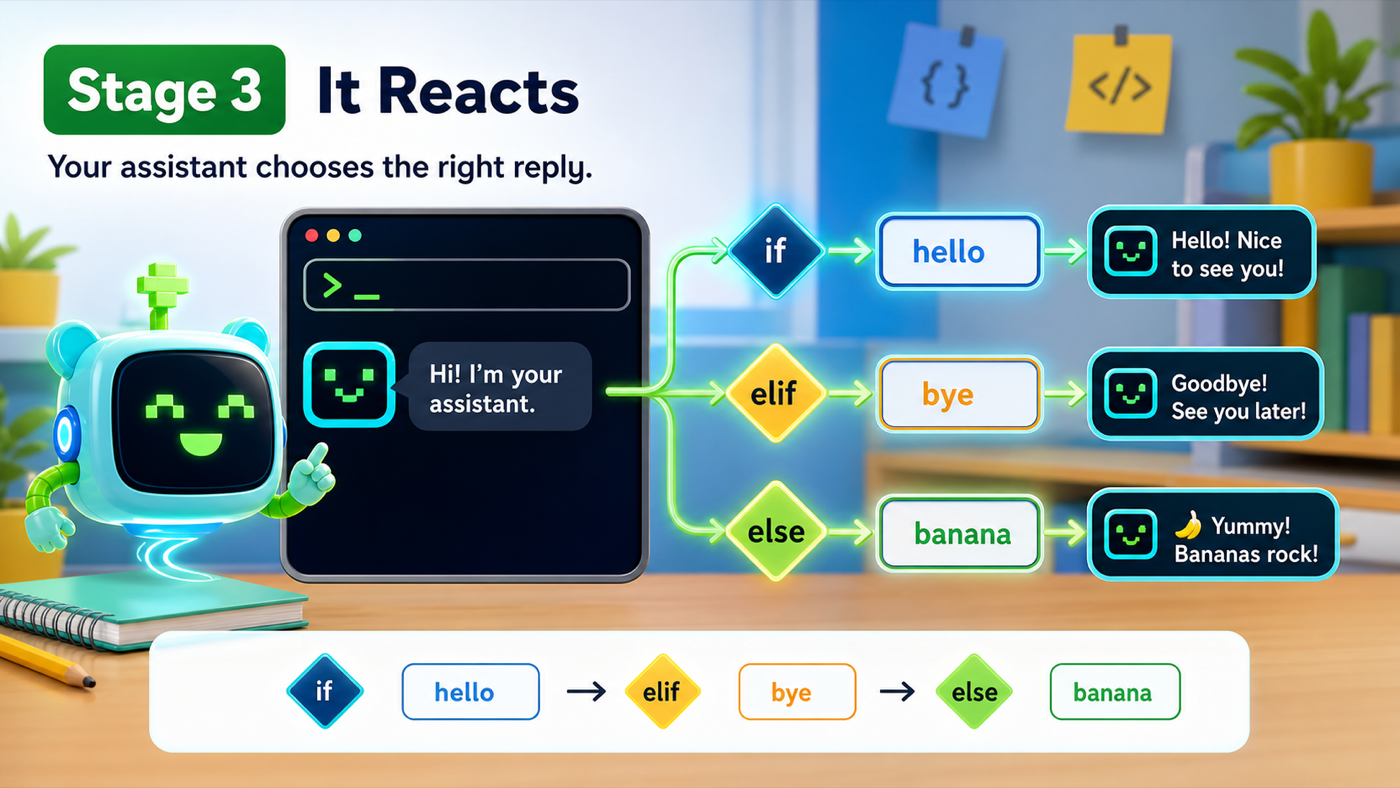
The big idea
So far your assistant always does the same thing. This stage it learns to choose — to look at what you typed and pick a different reply.
The tool for choosing is the if statement. An if runs some code only when a question is true. The question is called a condition — a yes/no test, like "did the user type hello?" We write that test with ==, which asks "are these two things equal?"
Three keywords work together:
if— check the first condition.elif(short for "else if") — if the first was false, check another.else— if none of the conditions were true, do this instead.
- condition
- A yes/no question the program asks, like command == "hello".
- ==
- Asks 'are these equal?' One equals sign stores a value; two equals signs compares.
- if / elif / else
- Choose what to run: if checks first, elif checks next, else covers everything left over.
Make sure you finished Stage 2: It Knows You — your assistant should greet you by name.
Build it
Step 1 — Read one command
First, after the greeting, ask the user for a command and store it in a variable. A command is just a word the user types to tell the assistant what to do.
assistant.py
Where it goes: Add this under your greeting lines, at the bottom of the file.
This reads one command. Next step decides what to do with it.
speak("Type a command: hello or bye.")
command = input("> ")
Step 2 — React differently to each command
Now the choosing. We check the command against "hello", then "bye", and if it's neither, we fall through to else.
Trace the decision
- Python checks
if command == "hello". If the user typed hello, it speaks the hello reply and skips the rest. - If not, it checks
elif command == "bye". If that's true, it speaks the goodbye and skips the rest. - If neither was true, the
elseruns — the catch-all reply.
One equals or two?
To check whether the user typed hello, do you write command = "hello" or command == "hello"? Why?
Check your thinking
command == "hello" — two equals signs. One equals sign would try to STORE "hello" in command. Two equals signs ASK whether they're equal.
assistant.py
Where it goes: Add this right under the command = input("> ") line.
Exactly one of these three branches runs each time.
if command == "hello":
    speak(f"Hello again, {name}!")
elif command == "bye":
    speak("Goodbye for now!")
else:
    speak("I don't know that one yet.")
Run it. Type hello — it greets you. Run it again and type bye — a different reply. Run it once more and type banana — the friendly "I don't know that one yet." Your assistant is reacting.
Notice the indentation: the lines under each if/elif/else are pushed in. That spacing is how Python knows which lines belong to which branch. Line them up carefully.
Understand it
Here's the honest truth about your "smart" assistant: it doesn't understand the word hello. It just compared two strings and found they matched. That's it. It looks smart because you wrote good rules for it to follow — and writing good rules is exactly what real programming is. That's a superpower, not a letdown.
We used else as a catch-all on purpose. Without it, typing anything unexpected would make the assistant say nothing, which feels broken. A good assistant always answers, even if the answer is "I don't know that yet." Covering the "everything else" case is a habit that keeps programs feeling friendly instead of dead.
Try this
Try this
Three short thinking checks. Use evidence from the stage you just built.
What does the assistant say if you type Hello with a capital H? Predict first, then try it. (Hint: == is picky about capital letters — we'll fix that in Stage 8.)
Add an elif command == "joke": branch that speaks a joke you make up. Does adding a third choice work the same way as the first two?
Right now the assistant reads exactly one command and then the program ends. What if you wanted to give it command after command without restarting? (Stage 4 makes it keep listening.)
Test your stage
Stuck? Compare carefully
assistant.py
Where it goes: Compare this against your whole file. Use it only if your program won't run.
This is the full file at the end of Stage 3.
import subprocess


def speak(text):
    print(text)
    subprocess.run(["say", text])


speak("Hi! My name is Pixel.")

name = input("What is your name? ")
speak("Nice to meet you, " + name + "!")
speak(f"I'm ready when you are, {name}.")

speak("Type a command: hello or bye.")
command = input("> ")

if command == "hello":
    speak(f"Hello again, {name}!")
elif command == "bye":
    speak("Goodbye for now!")
else:
    speak("I don't know that one yet.")
- Typing
hellogives the hello reply. - Typing
byegives the goodbye reply. - Typing anything else gives the catch-all reply (no silence).
- Design check. Read your
elseline. Is it friendly, or does it sound like an error? Make it sound like your assistant. - From memory. Without looking, write an
elifbranch for the commandthanks. Did you indent thespeak(...)line under it?
If it breaks
SyntaxErroron theifline. The line must end in a colon:. Check that each ofif,elif, andelseends with one.IndentationError. The line under anif/elif/elsemust be pushed in (indented). Each branch's reply lives on an indented line beneath it.- It always says "I don't know." You probably used one
=instead of two. Comparisons need==. Hellodoesn't matchhello. That's expected for now —==cares about capital letters. Stage 8 teaches the assistant to ignore them.